
You may have access to multiple Plex Media Server libraries, but perhaps you really only use one or two on a daily basis. Favoriting Libraries allows for accessing content from those libraries more quickly, on both the Home and My Libraries screens. It is also use to populate and order of home screen and library recommendation rows that appear
Favoriting Libraries
- Favoriting libraries in the modern apps syncs between apps for your account. Meaning if you favorite your movie library for example on your mobile device it will also be favorited for you on the TV app.
- If no favorites are selected then all libraries you have access to will display here but their content will not appear in recommendation rows on the home screen.
- The order of Favorite Libraries in My Libraries also affects the order of recommendation rows that appear on the home screen. The exact number and order of individual recommendation rows that appear per library depends on how the server admin has set them up in the server Manage Recommendation settings.
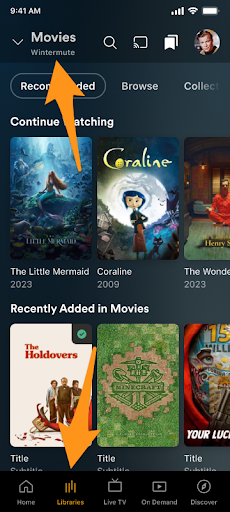
- From the bottom navigation bar, select Libraries.
- It will go to the first found owned library or the last used.
- From the top left select the library picker,
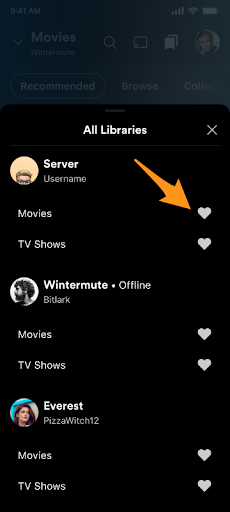
- If there are no favorites yet it will show all libraries separated by server (starting with your own server libraries if you have one).
- If there are already favorites then click on “All Libraries”
- Select the Heart icon (🖤) to the right of the libraries you wish to favorite
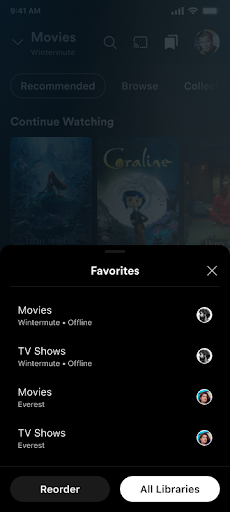
The next time the library picker is selected it will first open the sheet with Favorites from which you can choose All Libraries if you want to see the full list. The server they belong to will be added to the block as well to distinguish similarly named libraries.
Reordering Favorites
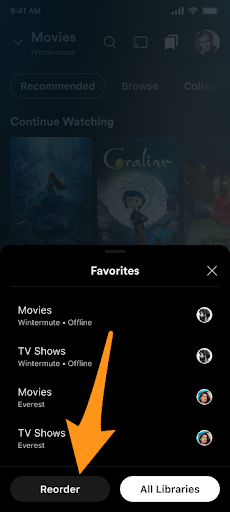
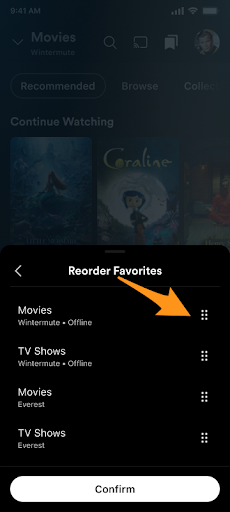
- From a libraries screen open the library picker menu on the top left or Hold down on Libraries in the bottom navigation
- Hit the Reorder button.
- To the right of each library name, the server admin’s avatar will be changed to a dotted drag handle.
Hold and drag individual library handles to reorder the list as you would like. (Tip: You may have to hold for a moment before moving your finger to drag.) - Click Confirm to finish and save the new order and the handles will change back to the server admin’s avatar.
- From the left navigation choose More at the bottom of the Libraries section of menu
- Select the Heart icon (🖤) to the right of the libraries you wish to favorite


Reordering Favorites
- From the left navigation choose MORE below your favorite libraries.
- In the menu that open choose Reorder Favorites
- Select the library cell you would like to movie
- Arrows will appear above and/or below the library’s cell indicating it is in move mode
- Move up or down with your remote to move the favorite library
- Click select when the favorite library is where you want it.

Last modified on: September 24, 2026